If a GitHub Actions scheduled workflow is not running, check the workflow file on the default branch, the schedule expression, whether the workflow is disabled, and whether the account associated with the schedule is still active. If it runs at an unexpected local time, check its configured timezone before changing the cron fields.
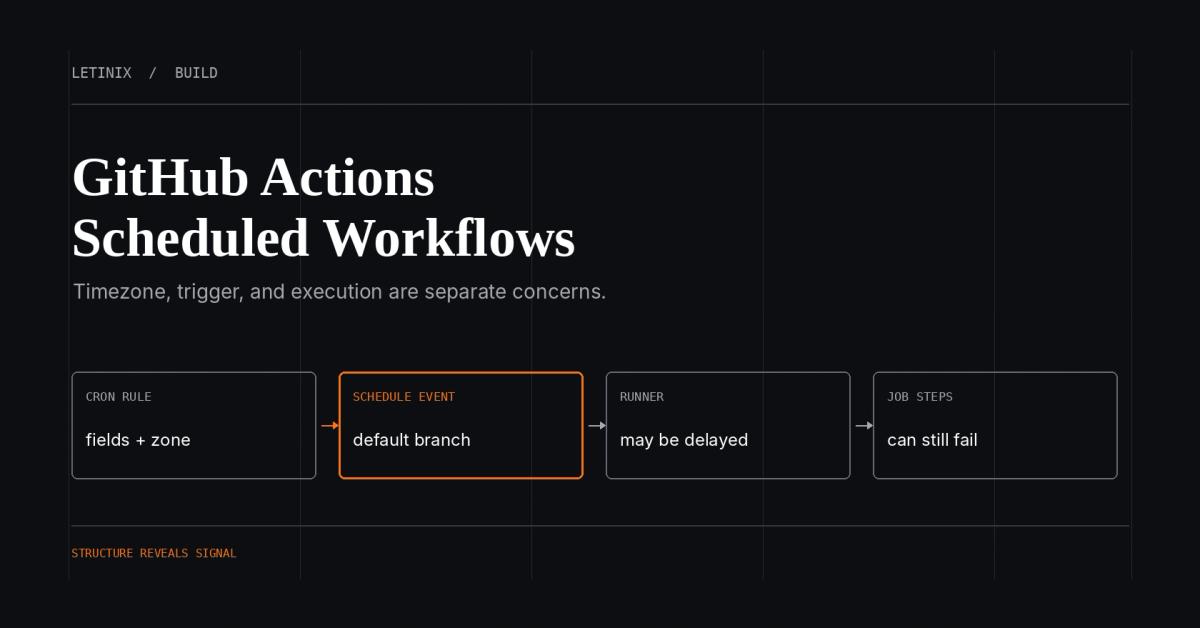
GitHub Actions uses a five-field POSIX-style cron expression. Current GitHub documentation supports an optional IANA timezone on each schedule entry; schedules without one use UTC. Scheduled events can also be delayed during periods of high Actions load, and sufficiently loaded queues can drop some runs. A cron expression requests a trigger—it does not guarantee that a job starts on the exact minute or completes successfully.
Configure a scheduled workflow#
Add a schedule event to a workflow file in .github/workflows/. This example is expected to trigger at 05:30, Monday through Friday, in New York time:
name: Weekday report

on:
  schedule:
    - cron: '30 5 * * 1-5'
      timezone: "America/New_York"

jobs:
  report:
    runs-on: ubuntu-latest
    steps:
      - name: Report scheduled trigger
        run: echo "Scheduled workflow triggered"
This is an illustrative workflow configuration, not an executed test. Replace the example command and checkout action version with values appropriate to your repository. The schedule configuration defines when GitHub may trigger the workflow; job success still depends on the runner, permissions, dependencies, and steps.
Read the cron expression correctly#
GitHub Actions schedule expressions use five fields in this order: minute, hour, day of month, month, and day of week. The weekday field uses 0–6, with Sunday represented by 0. Workflow syntax for GitHub Actions
| Requirement | Cron expression | Notes |
|---|---|---|
| Every 5 minutes | */5 * * * * | Five minutes is the shortest supported schedule interval. |
| Every day at 06:00 UTC | 0 6 * * * | Without a timezone field, the schedule uses UTC. |
| Weekdays at 09:00 in New York | 0 9 * * 1-5 | Add timezone: America/New_York to use local wall-clock time. |
| First day of each month at 02:15 UTC | 15 2 1 * * | Confirm the timezone and target semantics before using it. |
GitHub Actions does not support cron nicknames such as @daily or Quartz-specific syntax. Do not copy an expression from a scheduler that uses six fields, a seconds field, or different weekday conventions without adapting it to GitHub's documented format.
If you need to construct or inspect a basic expression, the Letinix Cron Expression Builder is a related utility. Check its current supported syntax and preview assumptions against GitHub Actions before relying on the result.
Understand timezone behavior#
A cron expression does not encode a timezone. If you omit the timezone property, GitHub Actions evaluates the schedule in UTC. If the intended schedule follows a local working day, use a supported IANA timezone such as America/New_York and verify the expected local time around daylight-saving transitions.
GitHub documents a specific spring-forward behavior: if a timezone observes daylight saving time and a scheduled time falls into a skipped hour, the workflow advances to the next valid time. Do not assume this behavior is identical to Linux cron or another scheduler. For fixed elapsed-time intervals rather than local wall-clock schedules, choose the scheduling model with that requirement in mind. Events that trigger workflows
Why scheduled workflows run late#
GitHub warns that scheduled events can be delayed during periods of high Actions load. The start of an hour is a particularly busy period; if the load is high enough, some queued scheduled jobs may be dropped.
If the task does not require an exact hour boundary, move it to a less crowded minute. For example, prefer 17 3 * * * over 0 3 * * * if both meet the requirement. This is a mitigation for load-related delays, not a guarantee of punctual execution. Events that trigger workflows
The schedule trigger and the job itself are separate stages:
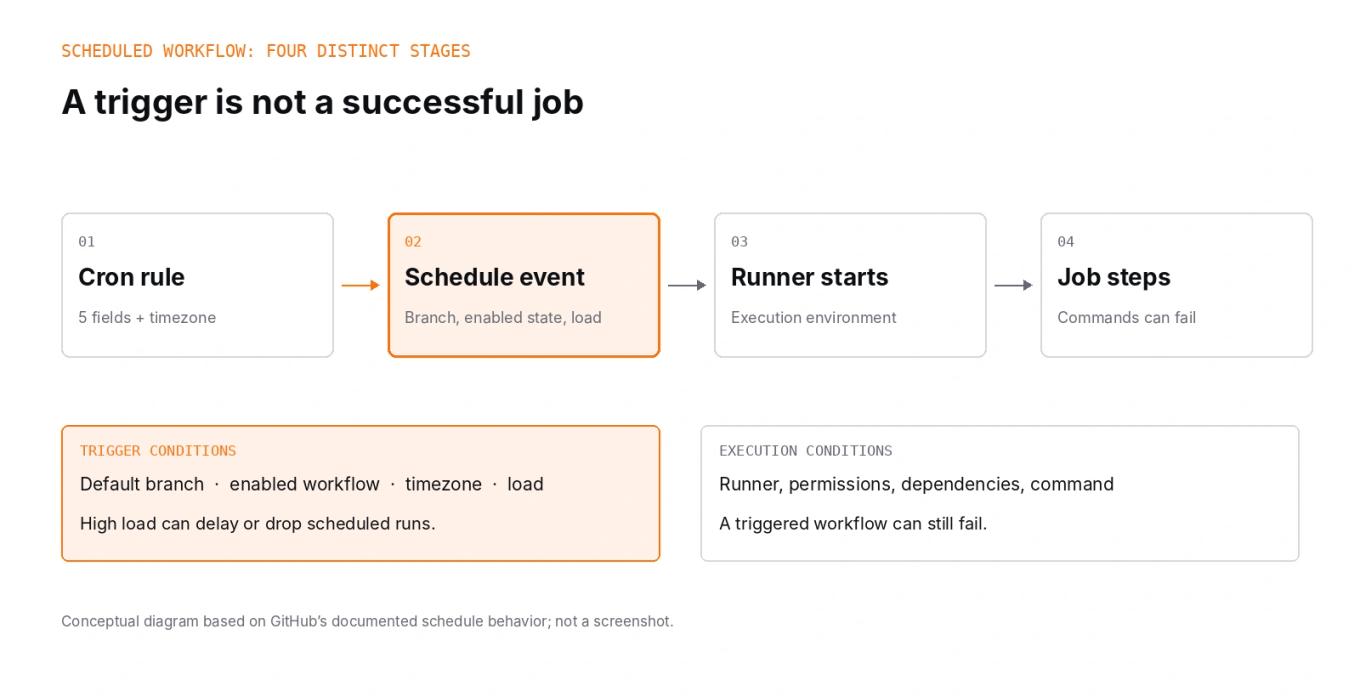
A valid expression can still fail to produce a successful job. Inspect the workflow run history and the job logs to distinguish a missing trigger from a run that started and then failed.
Troubleshoot a workflow that never runs#
Work through these checks in order:
- Confirm the workflow file is on the default branch. Scheduled workflows run only from the repository's default branch. A schedule added only to a feature branch will not trigger from that branch.
- Confirm the workflow is enabled. A disabled workflow does not respond to triggers. Check the repository's Actions settings and workflow state.
- Validate the event and expression. The workflow should define on.schedule with a supported five-field expression. Confirm the intended minute, hour, day, month, and weekday values.
- Check timezone configuration. If the time is offset from expectations, confirm whether the schedule uses UTC or an IANA timezone and account for daylight-saving transitions.
- Check for load-related delays. Look at the run history and avoid scheduling at the start of the hour when timing is flexible.
- Check repository activity for public repositories. GitHub automatically disables scheduled workflows in public repositories after 60 days without repository activity. Follow GitHub's instructions to re-enable the workflow if this applies.
- Check the associated actor account. GitHub documents cases where a schedule stops triggering if its associated actor account is suspended, deleted, or deprovisioned. A user with write access can update the cron schedule to reactivate a deactivated workflow in the documented circumstances.
- Separate trigger failures from job failures. If a scheduled run appears in the Actions history, inspect its event, runner setup, permissions, dependency installation, and failing step rather than continuing to change the cron expression.
Manual workflow_dispatch success is useful evidence that the workflow can run, but it does not prove that the schedule event is configured, enabled, and eligible to trigger.
Scheduling reliability checklist#
Before depending on a scheduled workflow for an operational task, verify:
- The expression uses GitHub Actions' five-field syntax.
- The timezone is explicit when local wall-clock time matters.
- The workflow file exists on the default branch and the workflow is enabled.
- The schedule does not rely on an exact start time that GitHub's load behavior cannot guarantee.
- A missed or delayed trigger is detectable and recoverable when the task is important.
- The job is safe to retry and does not corrupt state if work is repeated.
- The workflow has appropriate logging, failure notifications, and permissions.
If missing a run has a material operational consequence, do not rely on a schedule alone. Add a way to detect stale results and recover missed work, or choose a scheduler designed for the reliability requirements.
References#
Events that trigger workflows — GitHub Docs
Workflow syntax for GitHub Actions — GitHub Docs
GitHub Actions timezone support — GitHub Changelog

Software Engineer and Researcher, writing about AI, developer tooling and automation.