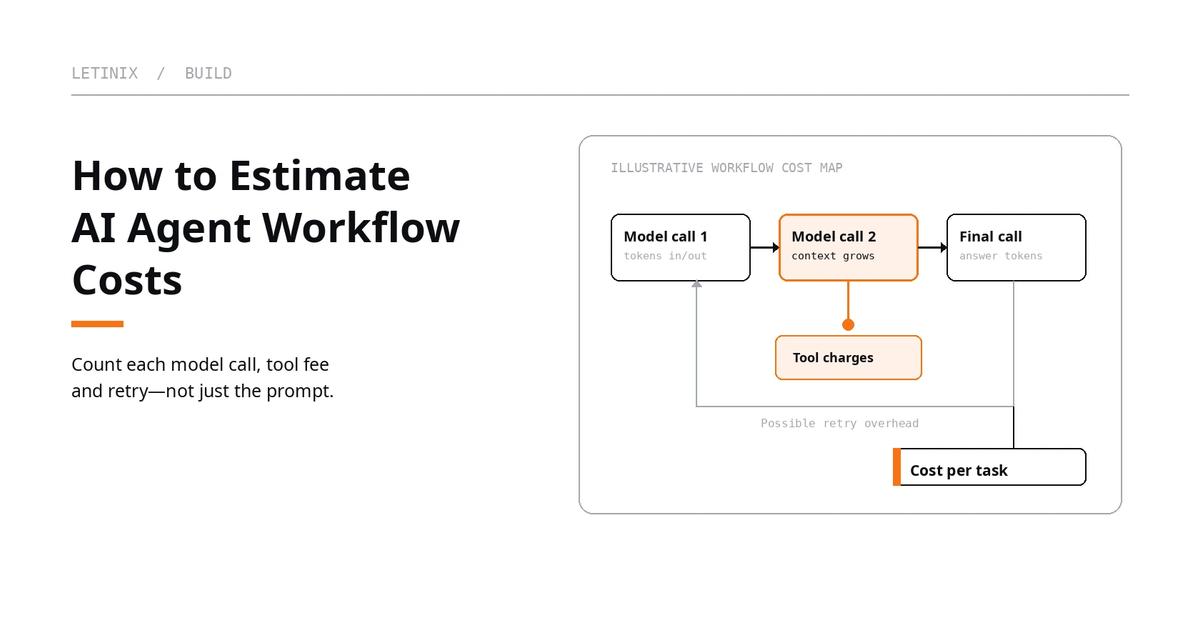
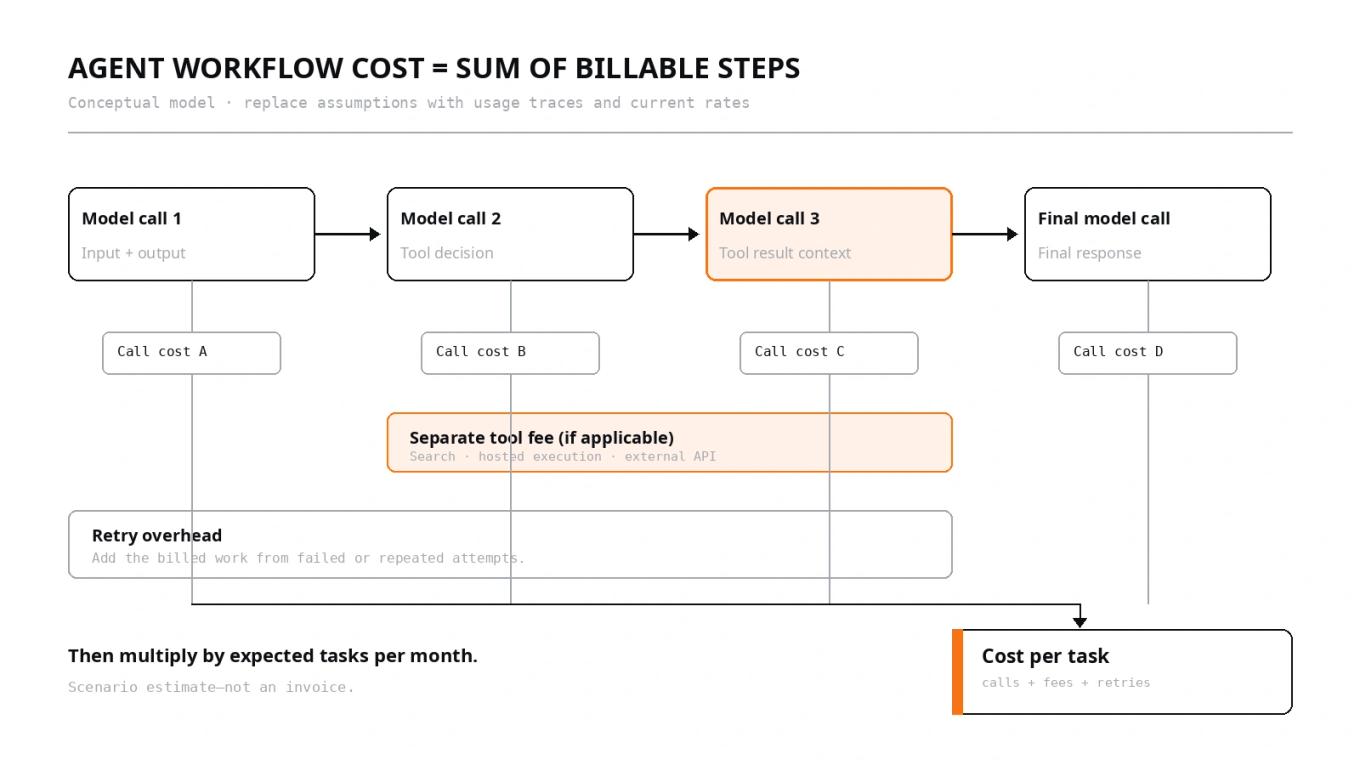
To estimate AI agent API costs, calculate the cost of each model call in the workflow, add separately billed tools and infrastructure, then account for retries and multiply by expected task volume. A single user request can trigger several model calls, and later calls may resend a larger context than the first. Estimating only the initial prompt will usually miss part of the bill.
A practical estimate starts with a workflow map and a small set of scenarios. For every model call, record input tokens, output tokens, model and pricing tier. Add tool charges where the provider bills them separately. Then calculate a normal path, a high-usage path and the cost of failures or retries.
The Letinix LLM API Cost Calculator can calculate token-cost scenarios from prices and token counts you enter. It does not model an entire agent graph automatically, so use it for call classes or totals after you have mapped the workflow.
1. Map one task from start to finish#
Start with a specific task, such as answering a support question using a knowledge base, summarizing a set of documents, or researching a topic and producing a report. Draw the sequence of steps that may require model inference or a paid tool.
- Interpret the task: the model receives the instructions and user request.
- Choose an action: the model decides whether to call a tool or continue reasoning.
- Run the tool: your application executes a search, database lookup, code operation or external API call.
- Read the result: the tool output is sent back to the model, which may choose another action.
- Produce the answer: the model generates a final response or structured result.
This is an illustrative pattern, not a required architecture. A simple agent may use one model call and one tool; a longer-running agent may loop through multiple tools and model calls. Measure the workflow your application actually uses rather than assuming every task follows the same path.
For each model call, record the model and pricing tier; input tokens including instructions, conversation state, tool definitions, retrieved documents and previous tool results that are sent again; output tokens including reasoning tokens when billed; cache assumptions; and any separate tool or service fee.
2. Calculate each model call separately#
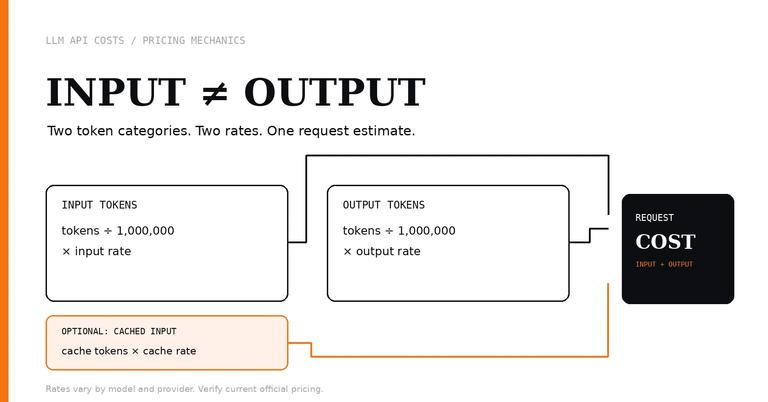
For a simple text call without caching, use the provider’s current input and output rates per million tokens:
call input cost  = input tokens  / 1,000,000 × input rate
call output cost = output tokens / 1,000,000 × output rate
call cost        = call input cost + call output cost
Repeat this for every call in the workflow, then add the results. Do not count one user action as one model request unless the implementation really makes only one call.
For example, an agent may first receive a short request, then send the model a tool schema, then send a large search result, then make a final call with accumulated context. Those calls can have different token counts. If a call resends prior conversation or tool output, those tokens can be billed again as input unless the provider’s caching rules apply.
The official documentation explains provider-specific billing details: OpenAI API pricingAnthropic Claude pricingGemini API pricing. Anthropic documents tool definitions and results as part of tool-use tokens, Google documents intermediate input and reasoning tokens in agentic loops, and OpenAI lists separate fees for some tools. Check the current page for the selected model and feature.
3. Build a per-task estimate#
Consider this hypothetical workflow with four model calls. These are illustrative inputs, not measurements from a deployed agent. Assume an input rate of $2 per million tokens and an output rate of $8 per million tokens solely to show the arithmetic.
| Model call | Input tokens | Output tokens | Estimated token cost |
|---|---|---|---|
| Interpret request | 1,200 | 300 | $0.0048 |
| Choose tool/action | 2,500 | 400 | $0.0082 |
| Process tool result | 4,200 | 600 | $0.0132 |
| Generate final answer | 5,000 | 900 | $0.0172 |
| Total | 12,900 | 2,200 | $0.0434 |
The example uses the same hypothetical rates for each call. The cost for each row is calculated from that row’s input and output tokens; the total is the sum of the four rows. The growing input count illustrates one source of cost: later calls may include tool output and more task context.
Now assume the workflow also incurs a hypothetical $0.01 in separate tool charges per completed task. The estimated total becomes $0.0534 per task before retries, infrastructure, logging, storage or other omitted costs. The $0.01 is an illustrative assumption, not a quoted provider fee.
For a real workflow, replace these values with API-reported token usage and current prices. If different calls use different models, use the corresponding rates for each call rather than applying one blended rate to the entire workflow.
4. Add tool fees and other billable operations#
A tool call is not always billed as a single flat fee. Depending on the provider and tool, the cost may include model tokens associated with tool use; a separate fee for a server-side search or hosted execution feature; an external service’s fee; and application infrastructure such as compute, queueing, database reads, storage, observability and network services.
Avoid double-counting. If a provider’s usage report already includes tool-related tokens in model input/output, do not add those tokens a second time. Add a separate fee only when the relevant pricing or invoice identifies one. The provider docs govern provider charges; other vendors’ billing terms govern external services.
5. Model retries and incomplete tasks#
Retries matter because a failed or incomplete attempt may already have incurred model or tool costs. Examples include a tool timeout after the model has generated a call, an invalid tool result that triggers another model request, or a final answer that fails validation and must be regenerated. Whether a particular failure is billable depends on the API and when the failure occurs; do not assume all failed requests are free or all are charged identically.
For a first estimate, use observed retry rates if you have traces. If you do not, state an explicit assumption and keep it separate from the base workflow cost.
expected cost per task = base cost × (1 + retry rate)
                       = $0.0534 × 1.08
                       = $0.057672
This simplified scenario assumes one additional full-cost attempt for 8% of tasks, with no further retries. Actual retries may cost less or more than the original path. If failures trigger only one small model call, estimate that retry path separately instead of multiplying the whole workflow.
6. Scale the estimate to monthly volume#
Once you have a per-task estimate, multiply it by expected completed tasks per month. Keep task volume distinct from model-call volume: one task may contain multiple calls, and some tasks may fail or be retried.
Using the hypothetical $0.057672 expected cost above:
- 1,000 tasks per month: $57.67
- 10,000 tasks per month: $576.72
- 100,000 tasks per month: $5,767.20
These figures include the illustrative tool fee and simplified retry assumption, but exclude infrastructure and any other charges not listed. They are not a forecast for a particular provider or product.
Create at least three scenarios: low usage with shorter contexts and fewer tool calls; expected usage based on measured token counts and observed retry rates; and a high but plausible case with long retrieved results, additional loops or longer outputs. Recalculate when prompts, tools, retrieval limits, model routing or user behavior change.
7. A small estimator for call-level token usage#
If you have a trace or spreadsheet of model calls, this Python example shows how to total token costs and add explicit per-task tool fees. It is a starting point for adapting your own usage export, not a tested integration with a provider API.
def estimate_task_cost(calls, input_rate, output_rate, tool_fees=0.0):
    """Estimate one workflow run from per-call token counts and explicit fees."""
    input_tokens = sum(call["input_tokens"] for call in calls)
    output_tokens = sum(call["output_tokens"] for call in calls)
    input_cost = input_tokens * input_rate / 1_000_000
    output_cost = output_tokens * output_rate / 1_000_000
    return {
        "input_tokens": input_tokens,
        "output_tokens": output_tokens,
        "token_cost": input_cost + output_cost,
        "tool_fees": tool_fees,
        "estimated_total": input_cost + output_cost + tool_fees,
    }

# Hypothetical example; replace with token usage from your own traces.
calls = [
    {"input_tokens": 1200, "output_tokens": 300},
    {"input_tokens": 2500, "output_tokens": 400},
    {"input_tokens": 4200, "output_tokens": 600},
    {"input_tokens": 5000, "output_tokens": 900},
]
print(estimate_task_cost(calls, input_rate=2.0, output_rate=8.0,
                         tool_fees=0.01))
Expected output for these hypothetical inputs is an estimated total of $0.0534, with 12,900 input tokens and 2,200 output tokens. The code does not fetch prices, infer retries, apply caching, or identify external infrastructure charges. Feed it actual usage for each model call, use the rate for that call’s model, and extend the model if calls use different rates or cached-input categories.
8. Use the calculator for the parts it supports#
The Letinix LLM API Cost Calculator accepts input and output prices per million tokens, token counts per request, request volume and optional cached-input assumptions. It returns per-request, daily, monthly and yearly estimates.
For an agent workflow, enter representative token totals and a blended rate only if all included calls share that rate and billing category. Otherwise, calculate separate call classes when steps use different models, rates, cache behavior or tool fees, then add the results in a separate worksheet.
The calculator does not automatically model branching workflows, per-step model routing, retries, separate tool charges, every modality or application infrastructure. Its output is a scenario estimate, not an invoice. For more detail, see LLM input vs. output token pricinghow to estimate LLM API costs before launch.
References#
Pricing — Anthropic Claude Platform
Gemini API pricing — Google AI for Developers

Software Engineer and Researcher, writing about AI, developer tooling and automation.