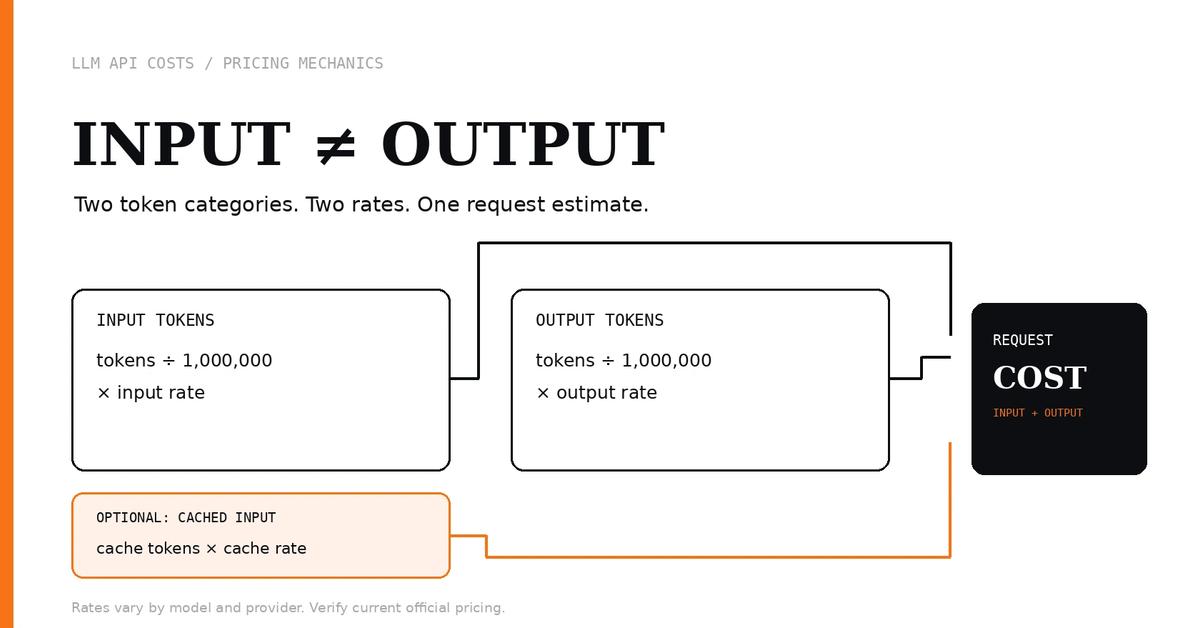
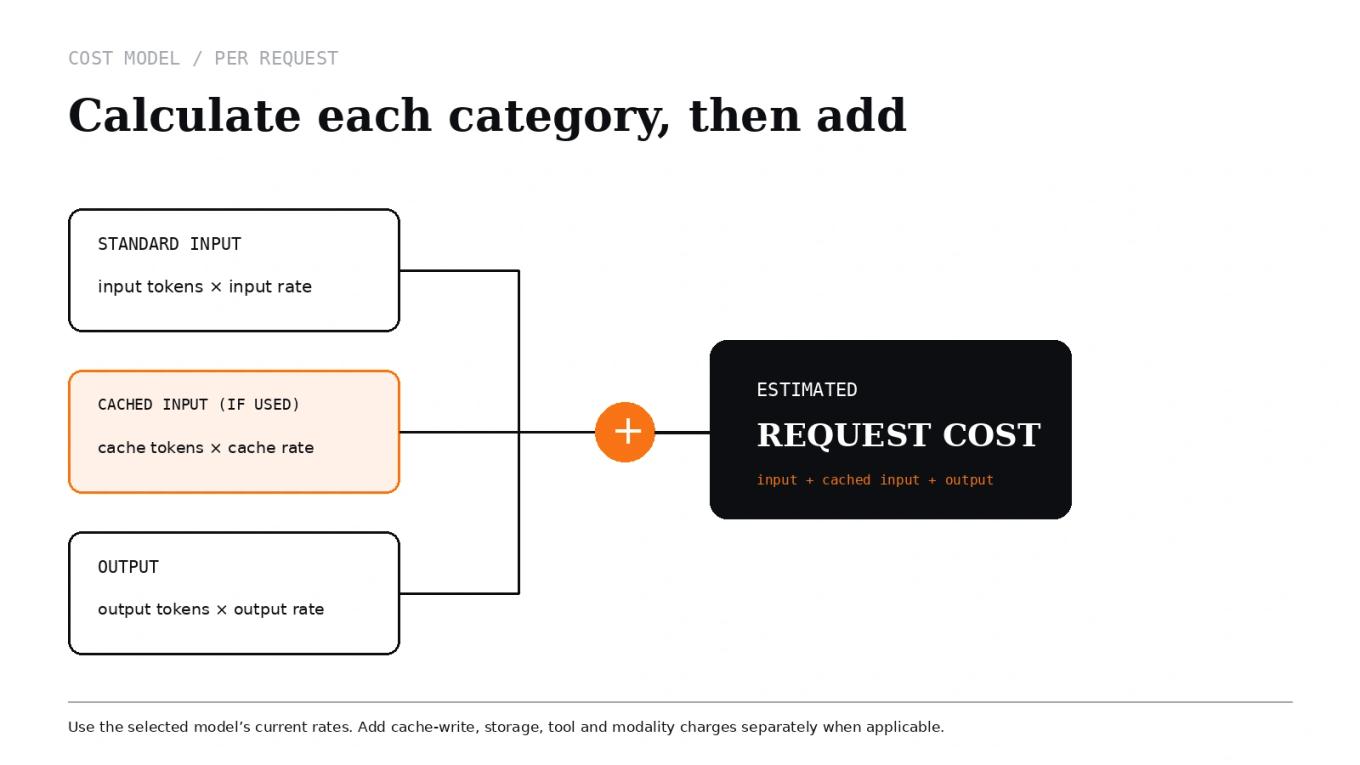
Input and output tokens are often billed at different rates, so the total number of tokens alone is not enough to estimate an LLM API bill. To calculate the cost of a request, multiply input tokens by the input rate, output tokens by the output rate, then add any applicable cached-input or other usage charges.
The exact rates depend on the provider, model, service tier, and billing conditions. OpenAI, Anthropic, and Google publish pricing tables that distinguish input from output and document additional pricing rules for features such as caching or tools. Check the OpenAI API pricing page, Anthropic Claude pricing, or Gemini API pricing for the model and tier you actually use.
The short version#
- Input tokens are the tokens the model receives, including relevant instructions, conversation history, retrieved text, and the current user message.
- Output tokens are the tokens the model generates. Depending on the model and API, billed output can include reasoning or thinking tokens as well as visible response text.
- Cached input tokens may be charged at a separate rate when a provider supports prompt or context caching. Cache writes and storage can have their own charges.
- Other billable operations—such as web search, tool use, audio, image processing, or agent runtime—may sit outside a simple text-token calculation.
Use the Letinix LLM API Cost Calculator to estimate a text-token scenario by entering the current rates from your provider's pricing page. It does not automatically fetch rates, so update your inputs when prices or model choices change.
Why input and output rates differ#
Providers price model usage by the type and amount of processing being billed. Input tokens represent material supplied to the model; output tokens represent material generated by it. The provider sets separate rates for each category, and output rates are often higher—but that is not a universal rule across every model, modality, or service tier.
The practical implication is simple: two requests with the same combined token count can cost different amounts if their input/output mix differs.
For example, a request containing 8,000 input tokens and 500 output tokens should not be estimated as though it contained 8,500 tokens all billed at the input rate. Calculate the two categories separately. The model's current pricing table—not a general rule about output being more expensive—determines the result.
Calculate the cost of one request#
For a simple text request with no caching or separately billed tools, use this formula:
input cost  = input tokens  / 1,000,000 × input price per 1M tokens
output cost = output tokens / 1,000,000 × output price per 1M tokens
request cost = input cost + output cost
The prices in this formula must use the same currency and billing unit. If the vendor lists a rate per million tokens, divide token counts by 1,000,000. Do not multiply the full token count by a single blended rate unless you deliberately calculated that blended rate from your expected input/output mix.
Worked example with hypothetical rates#
Assume one request uses 8,000 input tokens and 1,000 output tokens. For illustration only, suppose the input rate is $2 per million tokens and the output rate is $8 per million tokens. These are hypothetical values, not a current provider quote.
| Component | Calculation | Estimated cost |
|---|---|---|
| Input | 8,000 ÷ 1,000,000 × $2 | $0.016 |
| Output | 1,000 ÷ 1,000,000 × $8 | $0.008 |
| Total | $0.016 + $0.008 | $0.024 |
Here, input costs twice as much as output in absolute dollars because the request contains eight times more input tokens, even though the assumed output rate is four times higher. A higher per-token rate does not necessarily mean that category dominates the bill; the token volume matters too.
Estimate a month of usage#
Once you have an estimate per request, multiply it by expected request volume:
monthly cost = cost per request × requests per month
Using the hypothetical $0.024 request above:
- 1,000 requests per month: $24
- 10,000 requests per month: $240
- 100,000 requests per month: $2,400
These totals assume every request has the same token profile and that the only charges are the two token categories in the example. Real traffic varies. Measure representative requests, estimate a range, and separate common, long-context, and long-output cases if their token profiles differ materially.
For a repeatable estimate, enter your input and output token counts, current rates, and request volume into the LLM API Cost Calculator. Use the result as a scenario estimate, not as an invoice or a substitute for the provider's usage records.
Where cached input fits#
Caching can change the cost of repeated prompt material. When a provider supports prompt caching, some input tokens may be billed at a cache-read rate rather than the standard input rate. Depending on the service, writing content to a cache or keeping it stored can also have a separate charge.
A simple model of cached input is:
uncached input cost = uncached input tokens / 1,000,000 × input rate
cached input cost   = cached input tokens   / 1,000,000 × cache-read rate
Add those components to the output cost, and include cache-write or storage charges where applicable. Do not assume all cached tokens are free, that every model supports caching, or that the same cache lifetime and write/read multipliers apply across vendors. See the official OpenAI pricing documentation and Anthropic prompt-caching pricing for provider-specific rules; Google's Gemini pricing documentation also lists context-caching terms for supported models.
The current Letinix calculator can model a cache-read price and cache-hit percentage when you supply those values. Its result is only as accurate as the token counts, hit-rate assumption, and prices you enter. If cache writes or storage are separately charged in your configuration, add those costs separately.
Common estimation mistakes#
Treating every token as the same price#
A blended rate can hide important changes in the input/output mix. Keep the categories separate until you know the workload's typical distribution.
Counting only the visible prompt and answer#
Conversation history, system instructions, retrieved documents, tool definitions, and other request context can add input tokens. Some models also bill reasoning or thinking tokens as output even when those tokens are not shown as ordinary response text. Check the model's official billing documentation and use token usage reported by the API when available.
Assuming caching is always cheaper overall#
Cache reads may be cheaper than ordinary input, but cache creation, storage, eligibility, minimum cacheable prompt sizes, and retention windows can affect the economics. Use the actual provider's rules and your observed cache-hit rate.
Forgetting charges outside text tokens#
A text-token estimate may omit separately priced search or other tools, image and audio processing, hosting, orchestration, retries, and monitoring. Google documents separate pricing for some grounding tools; other providers also have feature-specific pricing. Add these components when your application uses them.
Using a price from an old model page#
Pricing and model availability can change. Before estimating or comparing providers, confirm the exact model, tier, region, processing mode, and cache rules on the official pricing page. Record when you checked the rate if the estimate will be used for a budget or business case.
A reliable estimation workflow#
- Choose the exact model and service tier. Do not mix a model's standard rate with a batch, priority, regional, or other tier's rate.
- Measure representative token counts. Include system prompts, conversation history, retrieved content, and generated output. Use API-reported usage where possible.
- Split input, output, and cached input. Keep each billing category separate and account for cache writes or storage if the provider charges them.
- Multiply by realistic request volume. Estimate normal and high-usage scenarios rather than assuming every request is identical.
- Add non-token charges. Include paid tools, modalities, runtime, and infrastructure that your workload actually uses.
- Recheck the official rates before making a commitment. A calculator is useful for the arithmetic; provider documentation remains authoritative for current billing rules.
Limitations and next steps#
The Letinix calculator estimates text-token costs from the rates and usage assumptions you enter. It does not automatically synchronize provider prices or model your complete agent graph, retries, every modality, cache-write/storage fees, or hosting and observability costs. Treat those as separate line items where relevant.
If you are planning an application, start with a representative request and calculate the input/output split before extrapolating to monthly volume. For broader planning, use the guide to estimating LLM API costs before launch alongside this calculation, then add the costs that sit outside simple text-token billing.
References#
- OpenAI API pricing — OpenAI
- Pricing — Anthropic Claude Platform
- Gemini API pricing — Google AI for Developers
- LLM API Cost Calculator — Letinix

Software Engineer and Researcher, writing about AI, developer tooling and automation.