On this page
- TL;DR
- What the migration does
- Prerequisites
- Step 1: Prepare the Markdown backups
- Step 2: Install the dependencies
- Step 3: Configure Sanity credentials and paths
- Step 4: Use the Markdown-to-Sanity importer
- Step 5: Run a dry run, then import
- Step 6: Verify the migration in Sanity
- Optional: Fix Hashnode-hosted images in previously imported posts
- Common migration pitfalls
- What this approach is useful for
- References
I recently moved my Hashnode articles into a Sanity-backed Next.js site without copying each post into Sanity Studio. I already had local Markdown backups, so I used a Node.js script to parse them, convert the content to Sanity Portable Text, upload supported images, and create drafts in my target dataset.
The most important part was not just importing the posts. It was making the migration safe to rerun: the importer moves a Markdown file to a separate done directory only after Sanity accepts the document. Failed files remain available for inspection and retry.
This guide explains that approach and the optional image-rehosting fix I prepared for older posts that still contain external image URLs. It is designed for an existing Sanity project with a custom post schema; the scripts are not plug-and-play with every Sanity schema.
TL;DR#
- Back up your Hashnode posts as local
.mdfiles and check their YAML frontmatter. - Match the importer to your Sanity
postand Portable Text schema. - Configure a write token and run
migrate-hashnode.mjs --dry-run. - Run the importer against a staging dataset, inspect the drafts, then migrate production after backing it up.
- If already imported posts contain legacy image URLs, use
rehost-hashnode-images.mjsseparately and verify the resolved image assets.
Both complete scripts accompany this guide. The examples below show the important parts; use the full files for execution.
What the migration does#
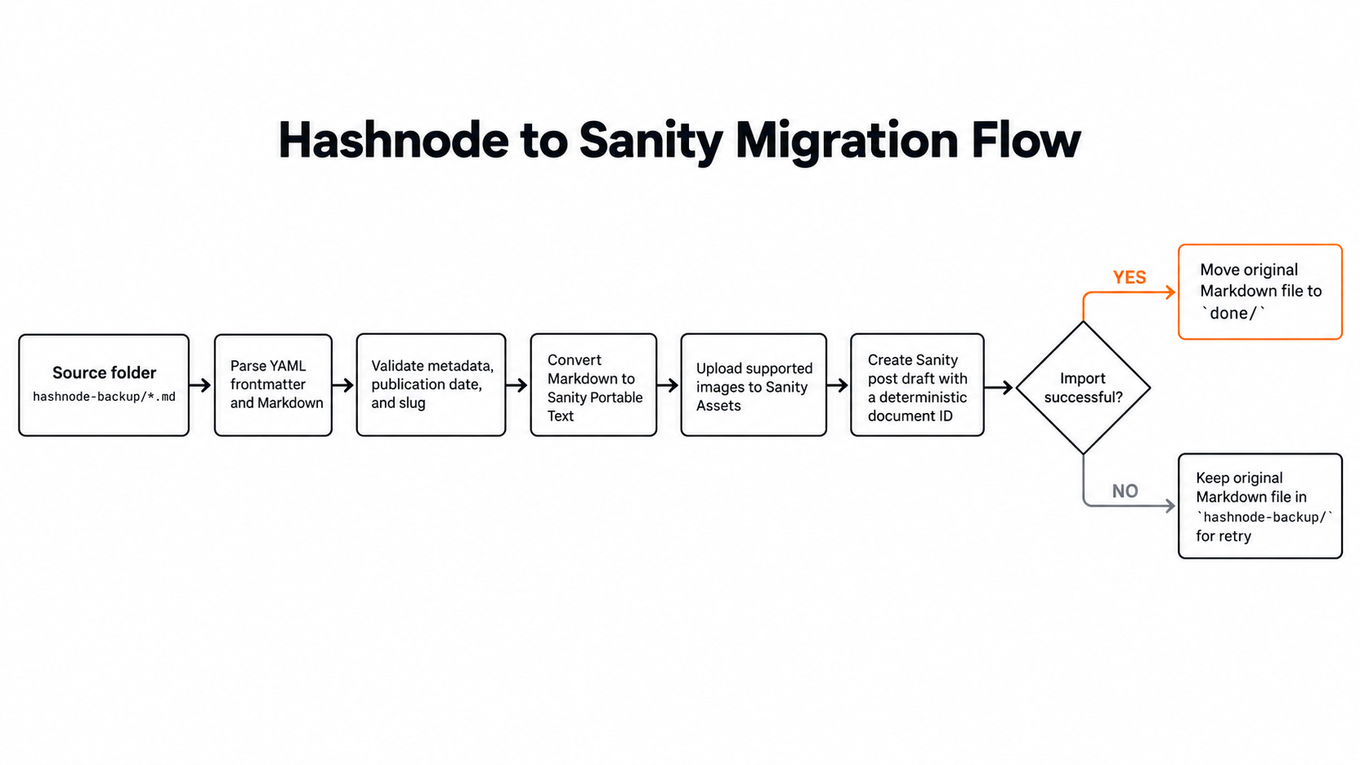
The source is a local directory of Hashnode Markdown backups. The destination is a Sanity dataset consumed by a Next.js website. Cloudflare was part of my site stack, but it does not affect the import commands.
hashnode-backup/*.md | v YAML frontmatter + Markdown parser | +--> metadata and historical dates +--> Markdown -> Portable Text +--> supported image uploads -> Sanity assets | v Sanity post draft (deterministic ID) | +--> success: move original .md to done/ +--> failure: leave original .md in hashnode-backup/This is a one-time content migration, not ongoing article synchronization. It creates drafts for editorial review rather than automatically publishing posts.
Prerequisites#
You will need:
- Node.js 22 or later and
pnpmin your existing project. - Access to your Sanity project, a dataset, and an API token permitted to create documents and upload assets.
- Local Hashnode
.mdbackups. Keep a separate untouched copy before running file-moving scripts. - A Sanity
postschema compatible with the migrated fields and a renderer for its custom Portable Text objects.
The original importer targets these fields:
Sanity field
Imported value
title, slug, excerpt
Frontmatter, title heading, or derived text
body
Portable Text blocks converted from Markdown
coverImage
Sanity image-asset reference when supplied
publishedAt
Original publication timestamp; required in source metadata
originalPublishedAt, updatedAt
Historical date and qualifying modified timestamp
category, subseries
Supported classification values, if present
seo
Title, description, and optional social image
affiliate
Defaults to {hasLinks: false} for later review
My schema supports text blocks plus custom types named bodyImage, code, contentTable, note, and divider. If your schema uses different names or field shapes, adapt the conversion code before importing. Sanity's Content Lake API does not automatically enforce every validation rule configured in Sanity Studio.
Step 1: Prepare the Markdown backups#
Place the files under a project-level folder such as:
my-site/ ├── hashnode-backup/ │ ├── first-post.md │ └── tutorials/ │ └── second-post.md ├── migrate-hashnode.mjs ├── rehost-hashnode-images.mjs └── .env.migrationHere is an illustrative Markdown file using frontmatter keys the importer recognizes:
--- title: Building a Simple API with Next.js slug: nextjs-simple-api date: 2024-05-14T10:00:00Z category: build description: A practical introduction to an API route. --- # Building a Simple API with Next.js Here is the article body, including **formatting**, links, and code.The importer's metadata aliases cover fields such as publishedAt, published_at, datePublished, and date. Check your actual Hashnode export format before using the script; it does not magically infer every possible frontmatter convention. Posts without a usable historical publication date fail validation rather than receiving today's date.
Only .md files are collected recursively; README.md is skipped. Images can be local files within the backup directory or recognized HTTPS image URLs. Unsupported embeds or HTML content require review, and inline HTML may be affected by the converter's default handling.
Step 2: Install the dependencies#
From the root of the project, install:
pnpm add -D @sanity/client @portabletext/markdown gray-matterThe libraries have separate roles:
gray-matterextracts YAML frontmatter.@portabletext/markdownparses Markdown into Portable Text.@sanity/clientwrites post documents and uploads image assets.
The converter is not the same as your Sanity schema. The migration script explicitly adapts output such as images, tables, code blocks, callouts, and dividers to the custom object types described earlier.
Step 3: Configure Sanity credentials and paths#
Create .env.migration in the project root:
SANITY_PROJECT_ID=your-project-id SANITY_DATASET=staging SANITY_TOKEN=your-sanity-write-token SOURCE_DIR=./hashnode-backup DONE_DIR=./doneAdd .env.migration to .gitignore and do not commit the write token. Keep DONE_DIR outside SOURCE_DIR; otherwise, moved files could be rediscovered during later runs. The paths ./hashnode-backup and ./done are relative to your working directory; paths beginning with / are absolute.
Start with a staging dataset and confirm that your token has only the permissions needed for the task. Back up the production dataset before moving live content.
Step 4: Use the Markdown-to-Sanity importer#
Save the full accompanying script as migrate-hashnode.mjs. Its central conversion is straightforward:
import {markdownToPortableText} from '@portabletext/markdown' const blocks = markdownToPortableText(markdown)But the complete implementation does more than call a parser. It adjusts unsupported heading levels to the target schema, maps recognized block objects, validates metadata and slugs, uploads images, and rejects some unsupported content instead of knowingly dropping it. Review complex articles manually because converter defaults can still degrade some input formats.
The importer uploads an image and stores its returned asset ID as a Portable Text reference. These excerpts come from two separate functions in the full script:
const {buffer, filename} = await getImageBytes(src, file) const asset = await client.assets.upload('image', buffer, {filename})const assetId = await uploadImage(node.src, file) output.push({ _type: 'bodyImage', _key: node._key || key(), asset: {_type: 'reference', _ref: assetId}, alt: first(node.alt) || title, decorative: false, })These are excerpts, not a standalone program. The companion script provides the helpers, the node loop context, caching, size checks, and validation. An uploaded asset becomes a Sanity reference, not simply a copied Hashnode URL.
The document write and move are ordered deliberately:
await client.createIfNotExists(doc) await moveAfterSuccess(file)A stable source-path hash is used to form each draft document ID, so rerunning the importer for the same relative source path will not create another draft. This is a limited form of idempotency: createIfNotExists() does not update a previously created article or check whether its current content matches the source. Renaming the source path can change its generated ID.
The original script writes draft-prefixed IDs directly. Test the resulting Studio draft and publishing workflow on your own dataset before relying on it in production; Sanity documents special handling and cautions around reserved draft IDs.
Step 5: Run a dry run, then import#
First check the files without making writes:
node --env-file=.env.migration migrate-hashnode.mjs --dry-runA dry run checks frontmatter and much of the conversion path. It does not upload assets, write Sanity documents, move files, or prove that remote images will download successfully during the real import.
If the reported failures are resolved, run:
node --env-file=.env.migration migrate-hashnode.mjsThe script prints per-file statuses such as DONE or FAILED and a final summary. On successful document creation, the source file moves into done/ with its relative subdirectory structure preserved. Failed Markdown files remain in hashnode-backup/ so you can correct and retry them.
Inspect imported drafts in Sanity Studio. Check titles, slugs, categories, code fences, tables, links, alt text, the original published date, and any image-heavy posts before publishing.
Step 6: Verify the migration in Sanity#
You can inspect a sample of migrated documents in Sanity Vision:
*[_type == "post" && ( string::startsWith(_id, "hashnode-") || string::startsWith(_id, "drafts.hashnode-") )][0...10] { _id, title, publishedAt, "slug": slug.current, "coverUrl": coverImage.asset->url, "bodyImages": body[_type == "bodyImage"]{ alt, "url": asset->url } }A successful image-asset reference should resolve to a Sanity image CDN URL beginning with https://cdn.sanity.io/images/. This query examines only a sample, not the entire dataset. Verify the website renderer separately; a correct Sanity document does not ensure the Next.js page uses the right image field.
Optional: Fix Hashnode-hosted images in previously imported posts#
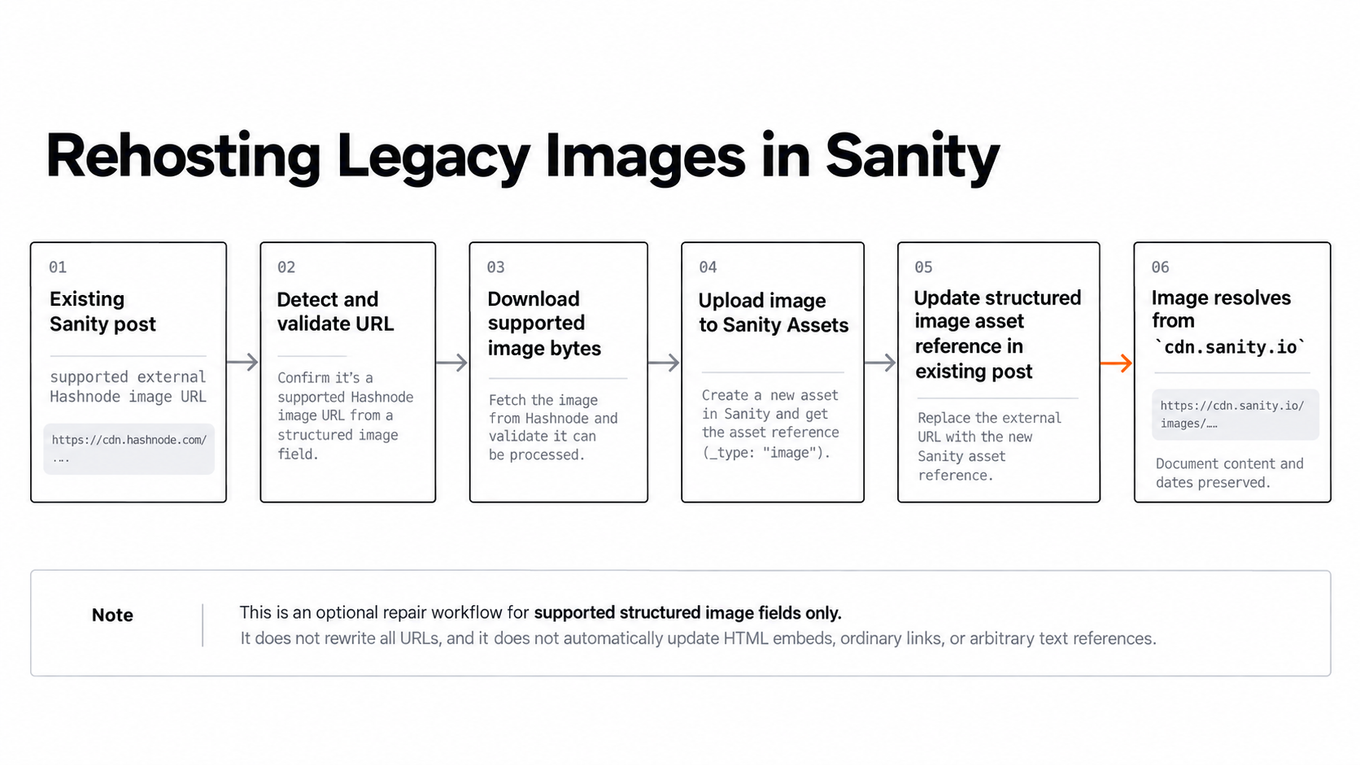
After an import, some article pages may still appear to use Hashnode-hosted images. That does not necessarily mean the importer failed: recognized images are already uploaded by the first script. An old post may contain legacy src, url, imageUrl, or asset.url fields, or the frontend may still render old URLs.
For structured image fields already stored in Sanity, the companion rehost-hashnode-images.mjs script can inspect coverImage, seo.ogImage, and body images. It downloads supported external images, uploads them into Sanity, replaces the external URL with a proper asset reference, and patches existing documents conditionally on their revision ID.
Preview first:
node --env-file=.env.migration rehost-hashnode-images.mjs --dry-runThen apply after checking the proposed changes:
node --env-file=.env.migration rehost-hashnode-images.mjsBy default, it targets documents with IDs created by the importer and recognizes Hashnode-associated HTTPS images. --all-posts broadens the document scope, while --all-remote-images broadens eligible image hosts. Use those options only after inspecting the data they would modify. This second script does not move Markdown files or rewrite HTML embeds, ordinary hyperlinks, or arbitrary strings.
If assets resolve correctly in Sanity but the site still renders old URLs, inspect your GROQ projection and Next.js image component. For example:
*[_type == "post"] { title, coverImage, "coverUrl": coverImage.asset->url }With next/image, allow the Sanity image CDN in next.config.ts when you use remote CDN URLs:
import type {NextConfig} from 'next' const nextConfig: NextConfig = { images: { remotePatterns: [ {protocol: 'https', hostname: 'cdn.sanity.io'}, ], }, } export default nextConfigIf you generate optimized URLs with @sanity/image-url, use the Sanity image object containing asset._ref. Avoid hard-coding legacy src values. Verify the original image's aspect ratio rather than assigning the same dimensions to every article image.
Common migration pitfalls#
Missing publication dates. The importer requires historical dates. Review and fix frontmatter rather than inventing publication timestamps.
Schema mismatch. A generic Sanity Portable Text schema may not recognize my custom bodyImage, code, contentTable, note, or divider objects. Match your schema and frontend renderer before running the importer.
Duplicate slugs and existing documents. The script checks slug collisions and uses stable IDs for the same source paths, but existing documents are not overwritten. Reimports are not a content-update mechanism.
Unconverted HTML and embeds. Review raw HTML, iframes, complex tables, callouts, and embedded content before publication. Some unsupported structures will fail, while parser defaults may cause lossy conversion in others.
Image downloads and asset cleanup. The importer and repair script require reachable source assets and limit image downloads to 15 MB. A failed import or patch after an upload may leave an unreferenced asset. Do not run arbitrary untrusted Markdown or image URLs through a write-credential migration script without strengthening network controls and validation.
Publication and SEO are separate steps. Draft import does not publish articles, preserve every old URL automatically, or set redirects and canonicals on your website. Check your historical article URLs, metadata, internal links, and applicable canonical/redirect behavior as a separate launch task.
What this approach is useful for#
For a collection of existing Markdown posts, a script is more repeatable than manual copy-and-paste. It also gives each file a visible outcome, makes retries manageable, and preserves original date information instead of treating migrated posts as newly written ones.
The exact duration depends on the number of posts, remote image sizes, API responsiveness, and validation failures; a quick personal migration is not a general speed guarantee. More importantly, migration success should be judged by the resulting drafts and published pages, not just a successful terminal exit.
References#
- Sanity: Import data — document and asset import considerations.
- Sanity: Creating and updating documents with
@sanity/client—createIfNotExists()and patch semantics. - Sanity: Working with assets in
@sanity/client— asset upload behavior. - Sanity: IDs and paths — document ID conventions and draft-ID cautions.
- Portable Text Markdown package — supported conversion features and parser options.
- Node.js:
--env-file— loading migration credentials into the Node process.

Software Engineer and Researcher, writing about AI, developer tooling and automation.