On this page
Intelligence isn't just about the model#
When we talk about AI products, we usually compare models.
- Qwen vs Gemini.
- Claude vs GPT-6.
- Reasoning vs Non-Reasoning.
- Latency vs Context window vs Benchmarks.
Those comparisons matter.
But after using enough AI products, I've started noticing something else.
Sometimes the difference between an assistant that feels intelligent and one that feels clunky has nothing to do with the model itself.
Sometimes...
it's just one extra click.
An Observation from Chrome's built-in AI#
Recently, I was trying Chrome's built-in Ask Gemini integration.
The workflow is simple.
- Highlight some text.
- Right-click.
- Select Ask Gemini.
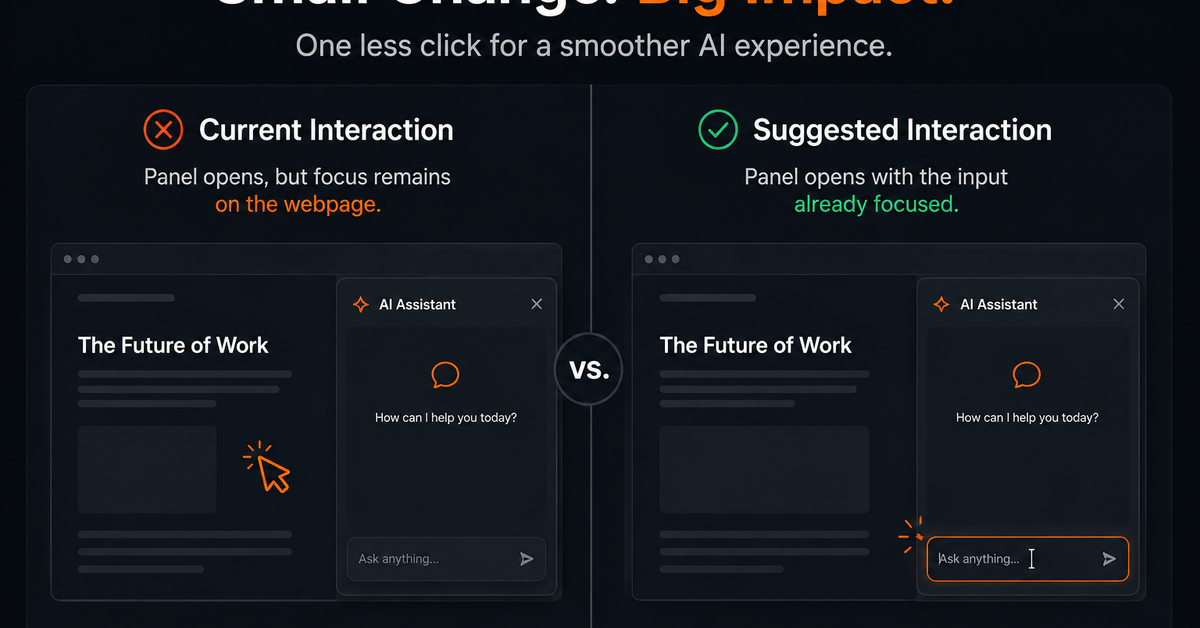
Chrome opens the Gemini side panel with the selected text already attached as context.
So far, the experience feels smooth.
Naturally, I start typing my question.
Nothing happens.
Not because Gemini is loading.
Not because Chrome is slow.
The keyboard focus is still on the webpage.
I have to click inside the prompt before I can start typing.
Functionally, everything works.
But the interaction doesn't align with my instinctive expectations. This is where the story of User Experience begins.
Why this Feels Unintuitive#
Once the Gemini panel opens, the interface communicates something important:
"I'm ready."
But the interaction says something different:
"Not yet."
That's a small mismatch between visual readiness and interaction readiness.
As users, we've developed a mental model from products like ChatGPT, Claude, Cursor, and Copilot.
Open the assistant.
Start typing.
The cursor is already waiting.
After explicitly choosing Ask Gemini, my intent is already clear.
Requiring one more click creates a tiny interruption between intention and action.
Could this be Intentional?#
Probably.
There are valid reasons Chrome might avoid automatically moving keyboard focus.
For example:
- Preserving expected browser focus behavior,
- Avoiding unexpected keyboard capture,
- Or maintaining consistency with other browser side panels.
Those are reasonable engineering trade-offs.
But in this specific interaction, I think the user's intent has already been established.
Clicking Ask Gemini is effectively saying:
"I'm done interacting with the webpage. I'm now interacting with Gemini."
At that point, automatically focusing the prompt would better align with the user's expectation.

One Click Sounds Insignificant#
Individually, it is.
Most users probably won't even consciously notice it.
They'll simply click again and continue.
But these tiny interactions accumulate.
The best AI products don't just generate good answers.
They remove friction between user intent and getting that answer.
That's often what makes an assistant feel fast, natural, and surprisingly intelligent.
Final Thought#
This isn't a bug.
It's not even a major usability issue.
It's a small UX observation.
But I think it's an interesting reminder that the perceived intelligence of an AI product isn't determined only by the model behind it.
Sometimes it's shaped by something much simpler:
How many unnecessary interactions exist between a user's intention and the AI's first response?
For me, this is one of those moments.
And it's exactly the kind of small product decision that can quietly make a good AI experience feel even better.
What do you think?#
Would you expect the prompt to automatically receive focus after clicking Ask Gemini, or do you think Chrome's current behavior is the better trade-off?
I'd love to hear perspectives from product designers, browser engineers, accessibility specialists, and anyone who has built AI-assisted interfaces.

Software Engineer and Researcher, writing about AI, developer tooling and automation.